Starting a business from home has never been more popular. If you are thinking about leaping, you are in good company. Entrepreneurship is gaining momentum across the country.
Data from a recent Registered Agents business formation report shows that March 2026 broke records, reaching 624,915 new company registrations in just one month. That surge carried right into April, which recorded 560,194 new filings, up 9% compared to the previous April.
“We are witnessing a profound shift in the American workforce,” said Molly Cavanah, Registered Agents’ VP of Revenue Growth and Data. “This growth is in direct response to an economy where ‘under-employed’ Americans are building side hustles to bridge the gap between rising costs and limited income.”
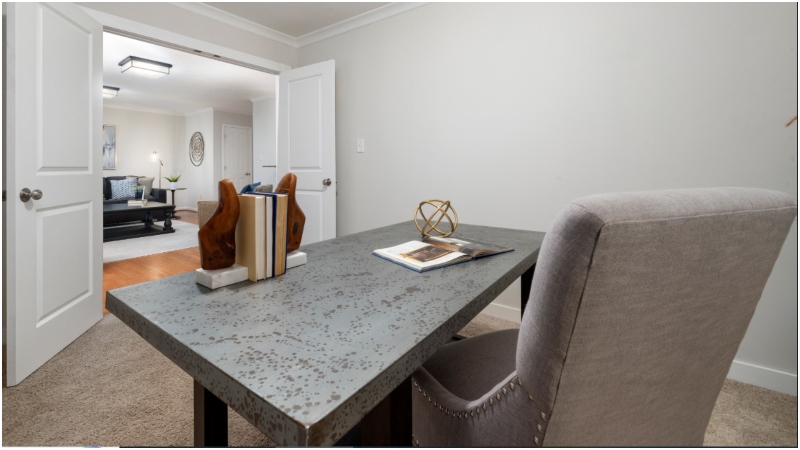
If you are joining this wave and launching a venture from your living room, kitchen table, or spare bedroom, creating a functional workspace is a good place to start. The right setup can help you stay organized, work comfortably, and build a space that supports your business as it grows.
Choose the Right Spot and Set Boundaries
Start by choosing a spot that gives you some privacy and helps you focus. A spare room with a door is ideal, but you do not need a separate room to create a functional home office. A quiet corner, landing, or converted closet can work just as well if you can use it consistently. Look for a place with natural light, minimal foot traffic, and enough privacy for client calls.
If you are working in a shared or open-plan space, use a rug, folding screen, or bookshelf to define your work area. A bookshelf can be particularly useful because it creates a visual divide while providing storage for books, supplies, and office essentials. As The Spruce suggests, open shelving can also separate areas without blocking natural light.
Finally, establish clear work hours and step away from your workspace when the day ends.
Furniture and Ergonomics That Support Long Workdays
Nothing in your home office matters more than where you sit and work, so invest wisely in your chair and desk. Look for an ergonomic seat with solid lower-back support and adjustable height to keep your feet resting flat on the floor. Position your desk so your elbows bend comfortably, and raise your monitor to eye level to prevent neck strain.
Still, even the best setup cannot completely prevent the physical tension that builds up after hours of sitting. Founders often push through tight shoulders and sore backs, particularly in entrepreneurial hubs like Austin. The city is home to 2,385 startups, accounting for 2% of all startups in the US, with approximately 66 startups per 100,000 residents.
For home-based entrepreneurs in the area, scheduling a regular massage in Austin can complement good workplace ergonomics by helping relieve accumulated muscle tension. Treat recovery like any other important appointment by adding it to your calendar, rather than waiting until discomfort forces you to take a break.
Lighting and Layout for Focus
Poor lighting causes eye strain, headaches, and afternoon slumps, while working near a window offers surprising health perks. According to research reported by Medscape, exposure to natural sunlight during the workday supports better glucose control and metabolic health than artificial office lighting alone.
To maximize daylight without screen glare, place your desk perpendicular to a window. For cloudy days or late evenings, add an adjustable task lamp with warm-to-neutral bulbs to keep the room comfortable rather than clinical.
Smart layout choices also keep your daily workflow running smoothly. Store frequently used items within arm’s reach, maintain a clear walkway, and position your webcam intentionally. A tidy background featuring a neutral wall, a houseplant, or a simple bookshelf ensures you look polished and professional during client video calls.
Storage and Organization Ideas
A cluttered workspace can make it harder to concentrate and find what you need. Start by assigning a specific place to everything. Use shelves for books and reference materials, drawers for stationery and office supplies, and a dedicated cabinet or storage box for inventory and shipping materials if you sell products.
Wall-mounted shelves, rolling carts, and under-desk drawers are practical options for keeping essentials accessible without taking up valuable desk space. Cable organizers can also help keep wires neatly tucked away and prevent them from getting tangled.
Make tidying up part of your daily routine. Spend ten minutes at the end of each workday clearing your desk, putting supplies back in place, and preparing for the next morning.
Organization should extend to your digital workspace, too. Create a consistent folder structure for documents, keep files clearly named, and use cloud backups to protect important business information.
Designing for Posture, Movement, and Comfort
Even the most supportive chair is no substitute for moving your body. When you work from home, you lose everyday reasons to get up, like commuting, stepping out for breaks, or walking across the office to chat with a colleague. Over time, prolonged sitting can contribute to forward-head posture, rounded shoulders, and stiff hips.
Build movement into your workspace design. Leave enough floor space for stretching, keep a water bottle across the room to encourage you to stand, and set a reminder to change positions every 30 to 60 minutes.
If stiffness keeps returning despite a good setup, your connective tissue may also need attention. As mentioned, Austin’s home-based professionals may look beyond ergonomics for relief. Myofascial release in Austin is one option worth exploring. This manual therapy focuses on tightness in the fascia, the connective tissue surrounding muscles.
Mantis Massage describes fascia as an underrated but extensive structure in the body and notes that improving its health can benefit overall well-being in several ways. Pair it with regular stretching and movement, and seek medical advice if the pain persists or becomes severe.
Frequently Asked Questions
How much space do I need to run a business from home?
Less than most people think. A desk, a supportive chair, and a bit of storage can fit in a corner. What matters most is that the space is dedicated, quiet enough to focus, and organized so your work doesn’t spread through the house.
What furniture do I need to start a home-based business?
Start with a sturdy desk and an ergonomic chair with adjustable height and lumbar support. You may also need a monitor, task lamp, storage drawers, and cable organizers, depending on your work. If you work at your desk for extended periods, a sit-stand desk or converter can help you switch between sitting and standing throughout the day.
How can I reduce neck and back discomfort from working at a desk?
Combine a proper setup with frequent position changes, daily stretching, and recovery habits such as massage or myofascial release. If pain is severe or doesn’t improve, speak with a healthcare professional.
Key Statistics at a Glance
| New business formations in March | 624,915 |
| New business formations in April | 560,194 |
| Year-over-year increase in April formations | 9% |
| Number of startups in Austin | 2,385 |
| Austin’s share of all US startups | 2% |
| Startups per 100,000 people in Austin | 66 |
Building a business from home takes planning, patience, and a workspace that supports your everyday needs. You can create an effective home office without a separate room or costly renovations. Choosing the right spot, investing in comfortable furniture, ensuring good lighting, and keeping things organized can make your workspace more practical and enjoyable.
Pay attention to your posture, make time for movement, and create boundaries between work and personal life. As your business grows, your workspace can evolve with it. The goal is simple: create a comfortable, practical environment where you can focus, serve clients, and do your best work.
Click here for more details.